Tokie Skills
Let AI agents
manage your folders
manage your folders
Tokie Skills is a set of instructions that teaches AI agents how to work with Tokie folders. Install the skill globally with any agent tool, and your AI agent — whether it's Claude Code, Cursor, Cowork, Codex, or OpenClaw — can create custom fields, organise layouts, write content, and even build interactive widgets inside your folders. Your folder is the best context for your agent.
Watch the video to see it in action. All the unique features Tokie enables is now available to your AI agent.
What it can do
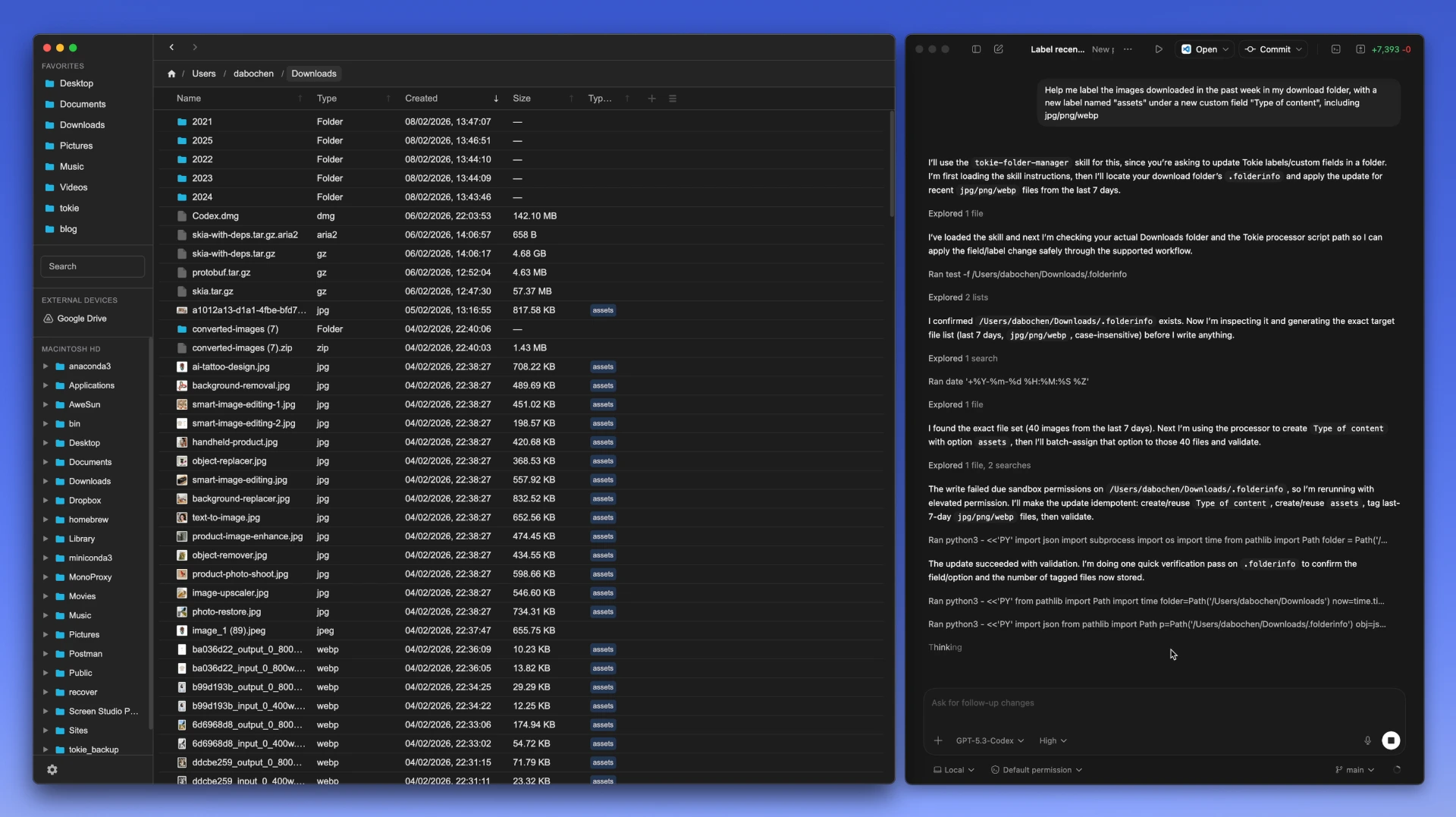
Create and manage custom fields & labels
Ask your AI agent to set up custom fields for any folder — text fields, number fields, and select fields with colour-coded labels. The agent can create, update, and delete fields and their options, turning any folder into a structured database. Perfect for project tracking, content calendars, asset libraries, and more.
Let agents do the heavy lifting work, and you can focus on the creative work itself.
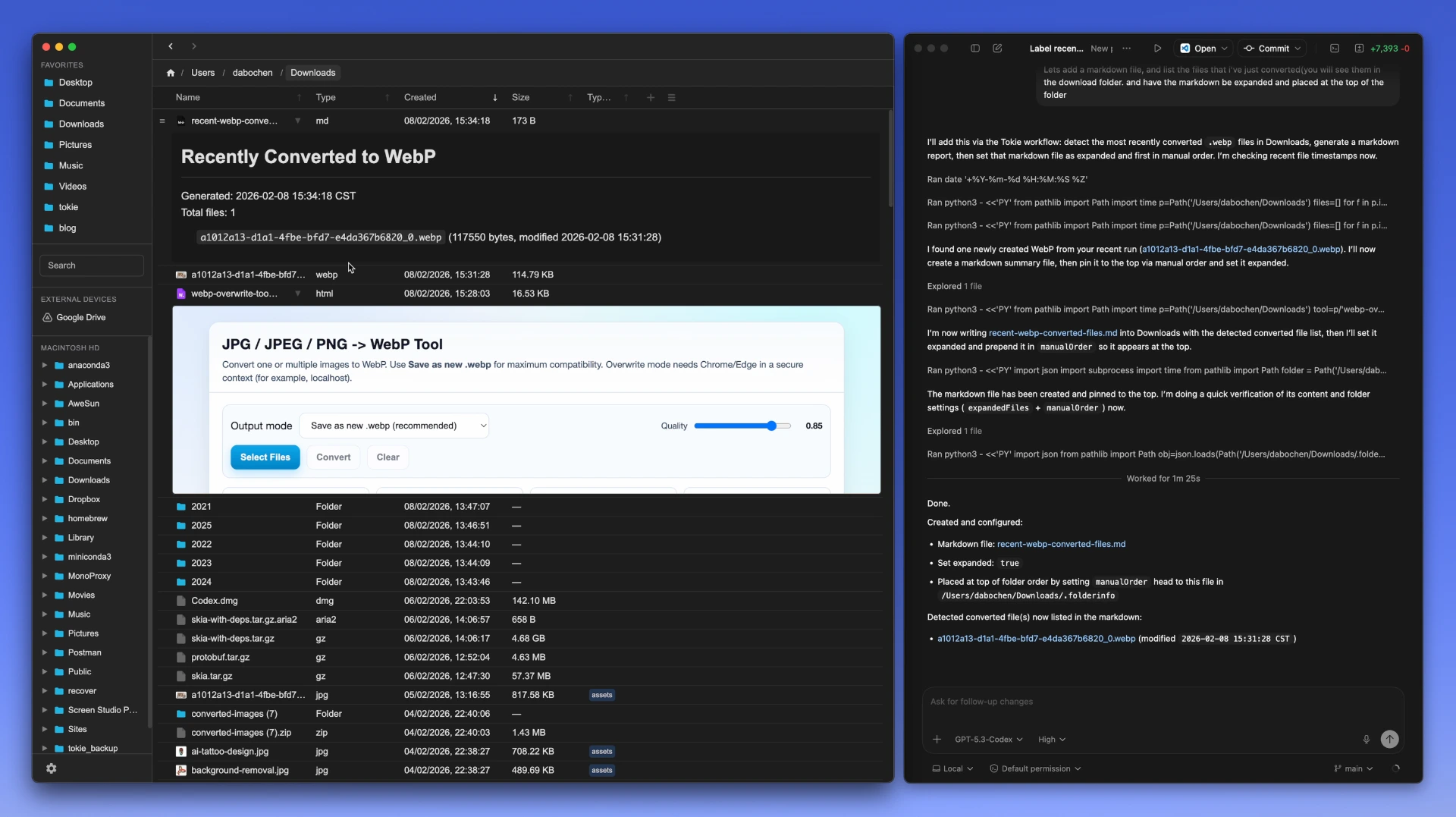
Create markdown content & control folder layout
The AI agent can create markdown files and write content directly into your folders. It can also control the layout — setting the order of files, expanding or collapsing inline previews, configuring which columns are visible, and adjusting column widths. Your agent handles the entire folder structure so you can focus on the work itself.
You can even create automations in agents like Codex for peirodic cleanups, or any tasks within your folders. And let it take notes on the progress, and you can check out the progress in the folder directly with the inline markdown.
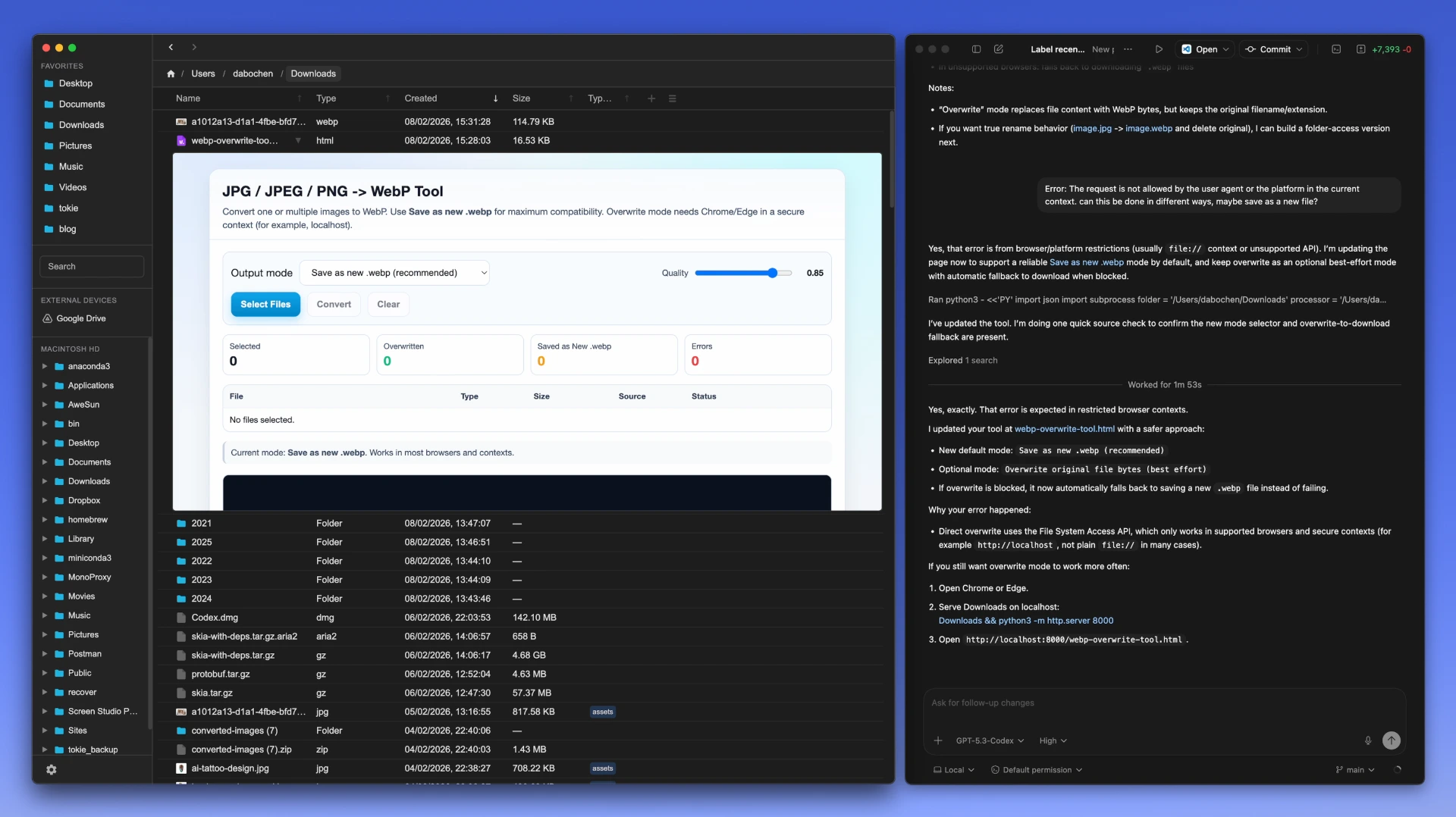
Build widgets & tools inside folders
Using the agent's coding skills, it can create HTML widgets and interactive tools that live inside your Tokie folders. Think calculators, dashboards, status boards, or any custom tool your project needs — all rendered inline within the folder view. The agent writes the code, Tokie displays it.
This is what makes the whole experience so powerful. Your folders are no long static storage, but a dynamic workspace for both you and your AI agent to collaborate in. Anyone who is serious enough about their work should create their own tools, and we believe that we are finally here.
How it works
1
Install the skill
Download the Tokie Folder Management skill from the app or below. Point your AI agent to the downloaded file to install it globally.
2
Ask your AI agent
Tell your AI agent what you want — "set up a project tracker", "add status labels", "create a dashboard widget". It reads the skill and knows how.
3
See it in Tokie
Open the folder in Tokie and see the changes — custom fields, organised layouts, expanded notes, and interactive widgets all rendered live.
Get the skill
The Tokie Folder Management skill is available in our skill library. Click below to view the full skill page with documentation and installation instructions.
tokie-folder-manager
Manage Tokie folders by editing .folderinfo files. Use when organizing files with custom fields, changing layout, reordering items, or creating content in Tokie-managed folders.
Claude CodeCursorCoworkCodexOpenClawSkill Library
Install locally
You can also install the skill directly from within the Tokie app. Click the Skills button on the bottom-left corner of Tokie, and in the popup panel, click Export Skills to download the skill folder to your project.

Example prompts
Not sure what to ask? Here are four ready-to-use prompts you can paste into your AI agent. Each one targets a different use case — just replace the folder path and let your agent do the rest.
Downloads inbox with triage labels
Use Tokie skills to turn my Downloads folder into an "inbox" view: add a Status label (To Process / Keep / Archive) and a Type label (Image / Doc / PDF / Zip / Other), then sort so To Process shows first. Create an INBOX.md and expand it inline with a short triage checklist of the biggest/newest files and what I should do next. Folder path: <PASTE_PATH>.
Project delivery folder
Use Tokie skills to organize this project folder for delivery: add labels for Deliverable type (Design / Spec / Assets / Other) and Stage (Draft / Review / Final), and sort so Final is on top. Generate a DELIVERY.md (expanded inline) that lists what to send and what still needs review. Folder path: <PASTE_PATH>.
Research reading queue
Use Tokie skills to turn this research folder into a reading queue: add labels for Topic and Read status (To Read / Skimmed / Done), then sort so To Read items rise to the top. Create an INDEX.md (expanded inline) that groups sources by topic and leaves space for 1–2 sentence takeaways. Folder path: <PASTE_PATH>.
Content pipeline
Use Tokie skills to make this content folder a simple pipeline: add labels for Platform and Stage (Idea / Draft / Edit / Ready / Published), and sort by Stage so I can see what's next. Create a PIPELINE.md (expanded inline) with a quick checklist for each stage and a "This week" section. Folder path: <PASTE_PATH>.
Let's
get started
get started
Go to Purchase license, get your license for activating the app on your computer, alternatively you can try the free version for 14 days then decide if you want it.
Q&A
Things that matter
Common questions about Tokie Skills and how they work.
Things that matter
Common questions about Tokie Skills and how they work.
What is a Tokie Skill?
A markdown file that teaches AI agents how to manage Tokie folders.
Which AI agents are supported?
Claude Code, Cursor, Cowork, Codex, OpenClaw, and any agent that reads skill files.
Do I need to know how to code?
No, you just describe what you want in plain language.
Does the skill modify my actual files?
It only edits Tokie's settings and creates markdown/HTML files you ask for.
Can I undo changes?
Yes, the plan runner supports backups and you can always re-validate.
Is the skill free?
Yes, the skill is free and open source.
Do I need Tokie installed?
Yes, Tokie renders the custom fields, layouts, and widgets the skill creates.
Where are skills stored?
In agents' skill library.
Can I use skills with cloud drives?
Yes, skills work with any synced folder — Google Drive, Dropbox, etc.